From Painted Cells to Digital Layers: Animation's Working Surface
Animation’s working surface shapes every mark, from painted cels to digital layers. Learn how materials change image-making without erasing older choices.
Animation’s working surface shapes what an artist can change, preserve, or let remain visible. A painted cel, a sheet of paper, and a digital layer may all hold a character’s face, but each makes revision feel different. The shift from painted cels to digital layers changed the labor around images; it did not make earlier ways of drawing obsolete.
Think of a production surface as more than a place to put a line. It is a set of permissions and constraints: what can be separated from the background, what must be redrawn, how color sits beside ink, and whether a mark can be moved without disturbing its neighbors. Looking at animation through that surface reveals why a new tool can alter a workflow while leaving its visual possibilities open.
What did a painted cel make possible?
In traditional cel animation, artists draw moving characters on transparent sheets, often called cels, while a painted background sits beneath them. The transparent support lets the background show through and allows a character layer to be placed over it. Instead of repainting an entire setting for every frame, a production can keep the setting still while changing the action above it.
That division is practical, but it also shapes the image. A clean contour can hold a flat area of paint; a painted background can carry textures and detail that would be cumbersome to redraw with the moving figure. The viewer sees one composition, although its parts were made and handled separately.
The method asks for careful planning. If an arm crosses a body, the animator must account for that overlap in the drawing, and the ink and paint work must preserve the intended edges. A correction may mean repairing a cel or making another drawing, not simply sliding a digital object aside.
Transparency also has a distinctive visual character. Edges, paint, and the support itself belong to a physical object that can catch light or show imperfections. Those qualities are not defects to eliminate by default; they can be part of the image’s tactile appeal.
How did paper, cutouts, and other surfaces widen the choices?
Cel animation is only one way to make images move. Paper animation can leave the grain, torn edge, or uneven pigment of a physical sheet in plain view. Cutout animation moves separate pieces, such as a paper hand or a painted shape, so the pose can change through repositioning rather than a freshly drawn figure.
These materials shift where the artist spends effort. A cutout animator may concentrate on joints, overlaps, and the silhouette of each piece. A paper animator may embrace a rough contour because its irregularity contributes to the rhythm or mood. The material is not a neutral carrier; its handling can become part of the performance.
Stop-motion approaches make the working surface even more literal: a puppet, miniature set, or object occupies a physical space in front of a camera. A change to a pose happens on the object itself. By contrast, a drawing-based scene can be built from marks that never existed as a complete physical figure.
These approaches remain useful because they offer different kinds of control. Paper can make a line feel immediate; a cutout can produce graphic, poster-like shapes; a miniature can place light across a real surface. Digital tools can imitate some of those appearances, but imitation does not erase the distinct decisions involved in working with the materials themselves.
What changes when the surface becomes digital?
A digital workspace can separate a scene into editable layers: a background, a character, a shadow, a highlight, or a foreground object. An artist can move or revise one element without repainting every other part. Software may also offer undo, selection, masking, and color adjustment, giving revisions a different cost and pace.
That flexibility does not mean the computer makes the image automatically. Artists still decide where a contour begins, how a shape overlaps another, and which details deserve attention. The software organizes and transforms marks; it does not decide what the scene should communicate.
Digital layers can also make a familiar separation more explicit. A background may sit on one layer, a character on another, and a shadow on a third. If the shadow needs to change, the artist can work on that element alone. Yet this convenience can invite excessive separation: too many independent parts may make the final composition feel assembled rather than drawn as a unified image.
Digital tools can preserve the look of earlier processes through textured brushes, scanned drawings, and simulated pigment. But a brush setting that resembles watercolor is not the same as wet pigment spreading across paper. The distinction matters when an artist wants the image to record an actual physical process rather than merely suggest one.
How can a small scene reveal the difference?
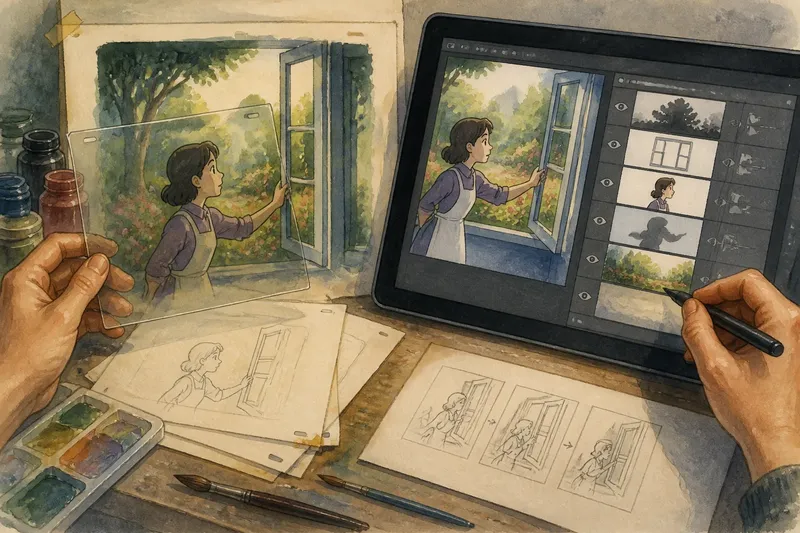
Imagine an animator drawing a character who opens a window onto a painted garden. With cels, the garden could remain on a background while the character and window action change on transparent sheets. The animator would need to plan the hand’s overlap with the frame and keep the moving figure’s position consistent from drawing to drawing.
Now imagine making the same scene digitally. The garden, character, window frame, and passing shadow might each sit on separate layers. The artist could adjust the shadow or reposition the window without redrawing the garden, while still choosing to draw the character’s motion anew for every pose.
The expected visible result is a scene with the same basic action, but a different revision path. The digital version offers more independent edits; the cel version makes the physical relationship between transparent sheets and painted background part of the process. Neither arrangement dictates whether the scene should feel delicate, bold, or playful.
A mixed workflow could scan a hand-painted garden and combine it with digitally drawn movement. That choice would preserve some marks as physical artifacts while making other elements easier to revise. It also asks the artist to consider whether the textures and edges belong together, rather than assuming that technical compatibility automatically produces visual unity.
Which animation surface fits a particular image?
The useful question is not which tool is newest, but which kind of change the image needs. Before choosing a method, consider:
- Does the background stay still? A layered approach can keep it in place while characters move above it.
- Should the material remain visible? Paper fibers, paint texture, or the surface of a miniature may be central to the image.
- Will parts move independently? Cels, cutouts, or digital layers can separate elements, though each handles overlap differently.
- How often might the drawing need revision? Digital editing can make certain changes easier, while physical methods may encourage decisions to be settled earlier.
- Does the scene benefit from a handmade irregularity? A shifted edge or uneven fill can carry expression rather than signal a mistake.
- Do the components need to match closely? Keeping a consistent contour, color treatment, and scale matters whether the pieces are painted, cut, or digitally assembled.
These questions are not a formula for selecting one medium. They help identify what the image asks the surface to do. A production might use different methods for separate scenes, or even combine them within a single frame.
What do readers often ask about animation surfaces?
Are digital layers the same as painted cels?
They can serve a similar compositional role by keeping moving elements separate from backgrounds. But a digital layer is editable information in software, while a cel is a transparent physical sheet with its own material qualities.
Can digital animation look handmade?
Yes, artists can use scanned marks, textured brushes, and irregular contours to evoke physical materials. The result can recall a handmade surface, though it does not reproduce every effect of handling paint, paper, or a miniature.
Why keep using paper or cutouts?
Those methods make certain textures, edges, and movements direct parts of the process. An artist may prefer their physical character or find that repositioning separate shapes suits the scene better than redrawing them.
Does a more editable workflow always make animation easier?
It can simplify particular revisions, but it also creates choices about layer organization, consistency, and how parts fit together. More editability changes where decisions happen; it does not remove the need to make them.
How should a production preserve useful options?
A thoughtful workflow can protect the image’s essential qualities without treating one material as the correct answer for every scene. An artist might keep a rough drawing, a clean contour, and color on separate digital layers, or retain the original paper drawing alongside a scanned version. The point is to know which parts are meant to stay flexible and which marks are worth preserving as made.
When comparing methods, look at the image itself: its edges, overlaps, texture, and movement. A painted cel may make a character feel cleanly poised against a rich background; cut paper may turn the same gesture into a graphic shape; digital layers may make a complex revision manageable. Animation’s working surface is most revealing when it is treated not as a ladder from old to new, but as a set of distinct ways to shape and change an image.
For an artist choosing a process, the practical starting point is a single frame or short movement, not a grand commitment to a tool. Sketch the same moment on paper and in a layered file, then notice which method makes the intended edge, overlap, or texture easier to achieve. That small comparison can clarify what the image needs before the workflow grows around it.